In early 2024, I set up a Raspberry Pi in the United States as a VPN server for my family in China. Our previous connection had become unreliable, including for access to ChatGPT. I could observe the connection failures, but I had not established which provider, network restriction, or service policy caused each one.
Ethan and Lily let me keep the Pi at their home. I am grateful for their help. This is an unsponsored project record; the networking explanation below has been revised to separate the setup I used from assumptions that were incorrect in the original post.
Hardware and software
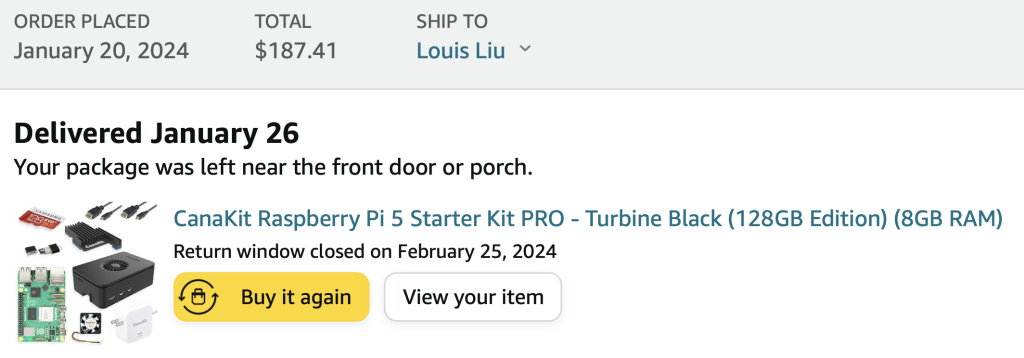
I bought a Raspberry Pi 5 kit for $187.41 after tax in January 2024. That is what I paid then, not a current price estimate. The small size and low power requirements suited a device intended to stay running at someone else's house.
I recorded this short video of the Pi on January 26 and uploaded it on March 14, 2024.
I used WireGuard with PiVPN and managed the machine from the command line. A desktop interface is not required for the VPN, although disabling it is not a prerequisite for a working setup. The PiVPN documentation is the maintained reference for installation and configuration.
Reaching the server is different from forwarding client traffic
There are two separate routing tasks.
First, the client must reach the Pi's WireGuard endpoint. In a common IPv4 home setup, the router has a public address and the Pi has a private LAN address. A router port-forward sends the chosen UDP port—often 51820—to the Pi. A stable LAN address or DHCP reservation keeps the target consistent. The port number is configurable.
This requires an inbound path from the internet. If the home connection is behind the ISP's carrier-grade NAT, a forwarding rule on the home router alone does not create that path.
Second, traffic inside the tunnel must be routed onward. If clients use the Pi as an internet gateway, the Pi needs IP forwarding, appropriate firewall rules, and usually source NAT for private IPv4 tunnel addresses. Alternatively, a routed design needs return routes for the VPN subnet. A static route and a NAT rule perform different jobs; they should not be described as the same router setting.
The earlier instruction to change UFW's global forwarding policy from DROP to ACCEPT was too broad. Permit the required forwarding paths for the actual VPN subnet and interfaces, and account for the rules installed by PiVPN. There is no universal interface name or subnet to paste into every installation.
IPv6 does not remove those distinctions
With globally routed IPv6, the client can address the Pi directly if both sides have suitable IPv6 connectivity and the router and host firewalls permit it. A normal IPv6 firewall opening is not an IPv4 NAT port-forward. The router's IPv6 address plus a port number does not automatically translate traffic to an IPv4-only Pi.
IPv6 also does not automatically encrypt traffic or make SSH more secure. SSH and WireGuard provide their own authentication and encryption regardless of the outer IP version.
An address can change because the ISP changes the delegated prefix or because the host uses changing interface addresses. Observing a change does not prove that DHCPv6 was the cause. Assigning an arbitrary fixed IPv6 address will not make it reachable if its prefix is no longer routed to the home.
Dynamic DNS and Cloudflare
I used Cloudflare DDNS to update DNS when the relevant public address changed. An A record holds an IPv4 address; an AAAA record holds an IPv6 address. The updater must publish the address of the intended endpoint, and clients may need to resolve it again after a change. DNS caching means updates are not instantaneous.
DDNS gives a changing address a stable name. It does not open firewall ports, supply a missing route, or remove carrier-grade NAT.
For ordinary WireGuard and direct SSH connections, I used DNS-only records. Cloudflare's standard HTTP proxy does not proxy arbitrary SSH or WireGuard traffic; its proxy-status documentation explains which services should bypass that proxy. DNS-only means clients connect directly to the published address. It is the connection protocol, not that DNS setting, that provides encryption.
SSH and troubleshooting
On Raspberry Pi OS, SSH can be enabled in Raspberry Pi Imager before installation or through the SSH option in sudo raspi-config. Restarting cron is unrelated and is not a required SSH setup step. Raspberry Pi's remote-access documentation covers the supported methods.
I first established local access, then configured remote connectivity. SSH and WireGuard are separate services: successfully reaching one does not prove that the other is reachable or that tunneled internet traffic can return.
For a PiVPN WireGuard installation, pivpn -d runs its diagnostic function. The WireGuard command documentation and troubleshooting FAQ help distinguish an unreachable endpoint, a missing handshake, routing failure, and DNS failure. A clean diagnostic result is useful evidence, not a guarantee of security or universal connectivity.
I also observed a case where IPv6 SSH worked remotely but failed from the same LAN. The original article blamed the router without enough evidence. The observation alone does not establish a cause: the address selected, DNS result, address scope, routes, and firewall behavior all need to be checked.
Other work on the Pi
I also hosted my DevGuardian Discord bot there. Having a machine I could administer directly suited that project. Comparing it with a serverless service requires considering the bot's connection model and runtime requirements; an assumed daily request count is not enough to establish which hosting approach fits.
The project taught me to trace each layer separately: endpoint discovery, transport, tunnel authentication, forwarding, and return traffic. Fixing one layer only resolves the failures caused by that layer.